Good Airbnb check-in instructions give a stranger seven things in the order they meet them: the exact address, what the building looks like, how to get in step by step, what to do if that fails, parking, Wi-Fi and the check-in time. Below is a template in that order, two filled-in sample messages, and the lines to swap for a key box, keypad, smart lock, intercom or meeting in person.
What should Airbnb check-in instructions include?
The address a maps app can find, the entrance, the entry steps, a fallback and the time. Parking and Wi-Fi come next because they are the next two things a guest needs after the door; how to write the Wi-Fi block is in how to give guests the Wi-Fi password.
Airbnb shows your instructions to the guest in their trip details 48 hours before check-in, or 24 hours before with a flexible cancellation policy, according to Airbnb’s help page on finding check-in instructions. You write them in your listing’s arrival settings, described in Airbnb’s help page on adding check-in instructions. The same text works for Vrbo or a direct booking.
Is there a check-in instructions template I can copy?
Yes, this one: the seven parts in the order a guest meets them. Copy it, fill in the brackets, and paste it into your listing’s check-in instructions or your guide.
Hi [guest name], here is everything for your arrival.

ADDRESS
[Full street address, exactly as it should be typed into a maps app.
Not the neighbourhood name or a landmark.]

WHAT TO LOOK FOR
[What the building looks like from the street: colour, number, any sign.
Which entrance, if there is more than one.]

GETTING IN
[Step by step, in the order you would do them: which door, where the
lock box or keypad is, the code, which way to turn the key or dial.
If the code sometimes needs a second try, say so.]

IF SOMETHING DOESN'T WORK
[Your number, and when it is fine to use it: "call any time after you
have tried twice" beats "contact me if there is an issue".]

PARKING
[Where, whether it is free, what to avoid. Say "no parking" plainly if
that is the truth.]

WI-FI
[Network name and password. Spell it out if it could be misread:
a capital I against a lowercase l, zero against the letter O.]

CHECK-IN TIME
[The actual time, and what to do if they arrive earlier or later.]
What does a filled-in check-in message look like?
It reads like the template with nothing left in brackets. Here are two complete sample messages, built from the two sample guides on this site: Lantern House in Sarajevo, from the English sample guide, and Apartman Lanterna in Split, from the Croatian sample. Both places are made up; the wording is the kind a guest can follow with a bag in each hand.
Sample 1: a key box, Lantern House, Sarajevo
Hi Sam, here is everything for your arrival.

ADDRESS
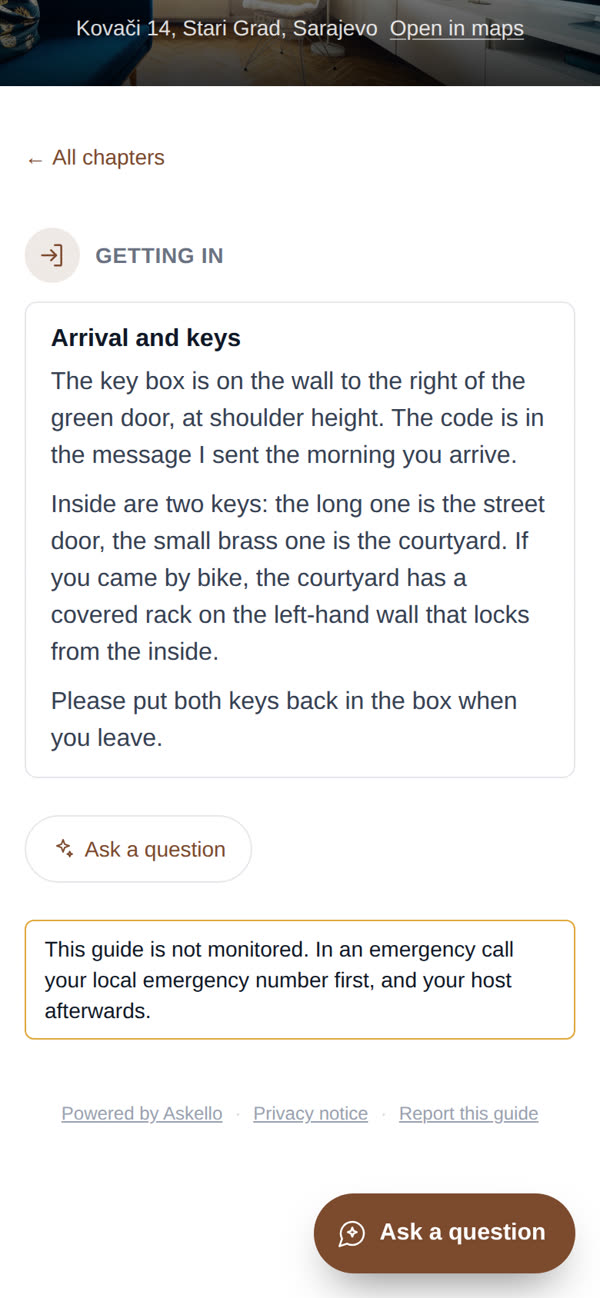
Kovači 14, Stari Grad, Sarajevo

WHAT TO LOOK FOR
A green street door. The key box is on the wall to the right of it,
at shoulder height.

GETTING IN
1. Enter the code I send you the morning you arrive.
2. Inside are two keys: the long one opens the street door, the small
   brass one the courtyard.
3. Please put both keys back in the box when you leave.

IF SOMETHING DOESN'T WORK
Call me on [number] if the box has not opened after two tries.

PARKING
The lane outside is pedestrian-only from ten in the morning, so unload
at the door before then if you can. The public garage two streets down
the hill takes cards and charges by the hour; from there it is a
four-minute walk up.

WI-FI
Network: LanternHouse
Password: lanterna2026 (all lowercase)

CHECK-IN TIME
From 15:00. Arriving earlier? Message me and I will say whether the
flat is ready.
Sample 2: a key box with a bike, Apartman Lanterna, Split
Hi Lena, here is everything for your arrival.

ADDRESS
Šperun 12, 21000 Split

WHAT TO LOOK FOR
A green door. The key box is on the wall to its right, at shoulder
height.

GETTING IN
1. Open the key box with the code in my message on the morning you
   arrive.
2. The long key is the street door, the small brass key the courtyard.
3. Came by bike? The courtyard has a covered rack on the left-hand
   wall that locks from the inside.

IF SOMETHING DOESN'T WORK
Call Ana on [number]; after two tries is the right time.

PARKING
The street in front is a pedestrian zone from ten in the morning:
unload at the door before then. The public garage two streets down
takes cards and charges by the hour, four minutes' walk uphill.

WI-FI
Network: ApartmanLanterna
Password: lanterna2026

CHECK-IN TIME
From 15:00.
How do I change the instructions for a keypad, smart lock or intercom?
Only the GETTING IN block changes. Write each entry method as numbered steps, including what the guest sees when it works and what to do when it does not.
Keypad or smart lock. “1. Wake the keypad by touching it. 2. Enter [code] and press the tick.
- Wait for the green light before you push the door. If it flashes red, wait ten seconds and try once more.” Warn that a lock can need a second try, so the guest knows to try again. If your smart lock is connected to Airbnb, Airbnb’s smart lock help page covers how it is set up; the steps still belong in the message.
Intercom. “Press the button labelled [name, not flat number] on the panel left of the main door. I will buzz you in; the lift is straight ahead, third floor, the door on the right.” Name the label exactly as it is printed, because flat numbering differs from country to country.
Meeting in person. “I will meet you at the door at [time]. If you are running late, message me when you land, and I will come as close to your time as I can.” Add where to wait if they arrive early: a café on the corner beats a doorstep.
What goes wrong in check-in messages?
The same five things, all caused by writing for yourself rather than for someone who has never seen the building.
The address is a neighbourhood, not an address. “We’re in the old town, near the main square” is useless to a navigation app. Give the address a map can resolve, then describe the building on top of it.
The lock is explained once, not as a sequence. “There’s a keypad, the code is 4471” skips which button comes first, whether to wait for a light or a beep, and what to do if nothing happens.
Local terms nobody explains. “Ring the intercom for flat 3B” assumes the guest knows what an intercom looks like in your country. Read your own instructions as if you had never been to your city.
No fallback. “What if this doesn’t work” is the question a guest actually has at the door, and the one left out when the code always works for you.
Sent once, findable never again. A message sent two days before arrival is buried under other messages by the time the guest is outside. Put the same text where it survives: a pinned message, a printed card by the door, or your welcome book.
How do I make sure guests can find the instructions at the door?
Keep one copy at a link that does not change between bookings, and send that link through every channel you use. When the code changes you correct one page, and it no longer matters which app the guest has open when they reach the door.
A message is a copy; a link is the current version. Pasting the full text into several channels is how a guest ends up with last season’s code, so write the steps once and link to them. Run this once before your next booking:
BEFORE THE BOOKING
[ ] The instructions live at a stable link that opens with no app,
    no account and no download.
[ ] They read properly on a phone held in one hand.
[ ] The address resolves in a maps app, the entry steps are in order,
    and the fallback is there.

AT BOOKING
[ ] The listing's check-in instructions are filled in, not left blank
    because you also send a message.

A FEW DAYS BEFORE
[ ] Pre-arrival message sent, with the link.

ON ARRIVAL DAY
[ ] Two lines on the channel the guest replies on, with the same link.

THE TEST
[ ] Open your own link on your own phone on mobile data, as if you had
    never seen it, and time how long the door code takes to find.
If the code changes after you have sent it, send only what changed: “The gate code changed today, it is now 4471. Everything else in the guide is the same.” If a guest writes from the door that they cannot find the instructions, reply in the same chat with the code and the link, then add the link to whichever channel they were looking in.
Where do check-in instructions go besides the Airbnb message?
Into the guide your guests keep for the whole stay, so the door steps sit next to the Wi-Fi, the house manual for the heating and appliances, the house rules and the checkout instructions. Check-in is the first question, not the only one: the next ones are listed in what guests ask most in a vacation rental, and travel logistics fit better in a separate pre-arrival message sent a few days earlier. To have the guide link reach every guest without sending it by hand, put it in your Airbnb and Booking.com scheduled messages.
Askello drafts that guide from your listing: paste your listing and the arrival chapter is drafted from the check-in details it already states. The door code is yours to add, because a listing never shows it.
Questions hosts ask
Where do guests find check-in instructions on Airbnb? In their trip details for the reservation, 48 hours before check-in (24 hours with a flexible cancellation policy), per Airbnb’s help page.
What is the best way to send check-in instructions for a vacation rental? Put them in your listing’s check-in instructions so they arrive on time, then keep the same text somewhere the guest can open at the door: a guide link or a printed card with a QR code.
Is there a sample of Airbnb check-in instructions I can copy? Yes: the two filled-in samples above. Copy either, change the address, the entry steps and the Wi-Fi, and keep the order.
Should the door code go in the Airbnb check-in instructions? Yes: guests see those only shortly before check-in, per the same help page, while the listing description is public. Never put the code in the description.